0%

pytorch入门笔记及资源集合

安装配置支持Cuda的pytorch

  • 参考教程
  • conda显示所有源
    • conda config --show
  • conda添加国内源
    • conda config --add channels <网址>
  • conda删除源
    • conda config --remove channels <网址>
  • 清华源网站清华源
  • 下载Cuda tool kit网站
  • 安装后在命令行输入nvcc -V测试是否安装成功
  • 安装后下载对应版本的cudnn网站
  • 将cudnn解压缩之后,binincludelib文件夹下的内容分别复制到cuda toolkit的安装位置下
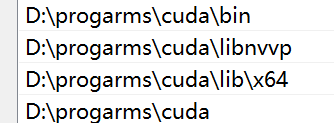
  • 在系统环境变量PATH中添加安装位置下的./bin, ./libnvvp, ./lib/x64和toolkit安装位置本身
    • picture 2
  • 检查系统环境变量中是否有CUDA_PATHCUDA_PATH_V12_4(替换为自己的版本号)
    • 在设置之前务必删完之前版本留下的环境变量
    • picture 3
    • 要保证系统环境变量的用户变量中的path和系统变量中的Path,以及系统变量中的CUDA_PATHCUDA_PATH_V12_4存在
  • 之后找到安装位置下的.\extras\demo_suite下面的bandwidthTest.exedeviceQuery.exe, 分别在命令行执行上述程序,看到Result=PASS表示成功
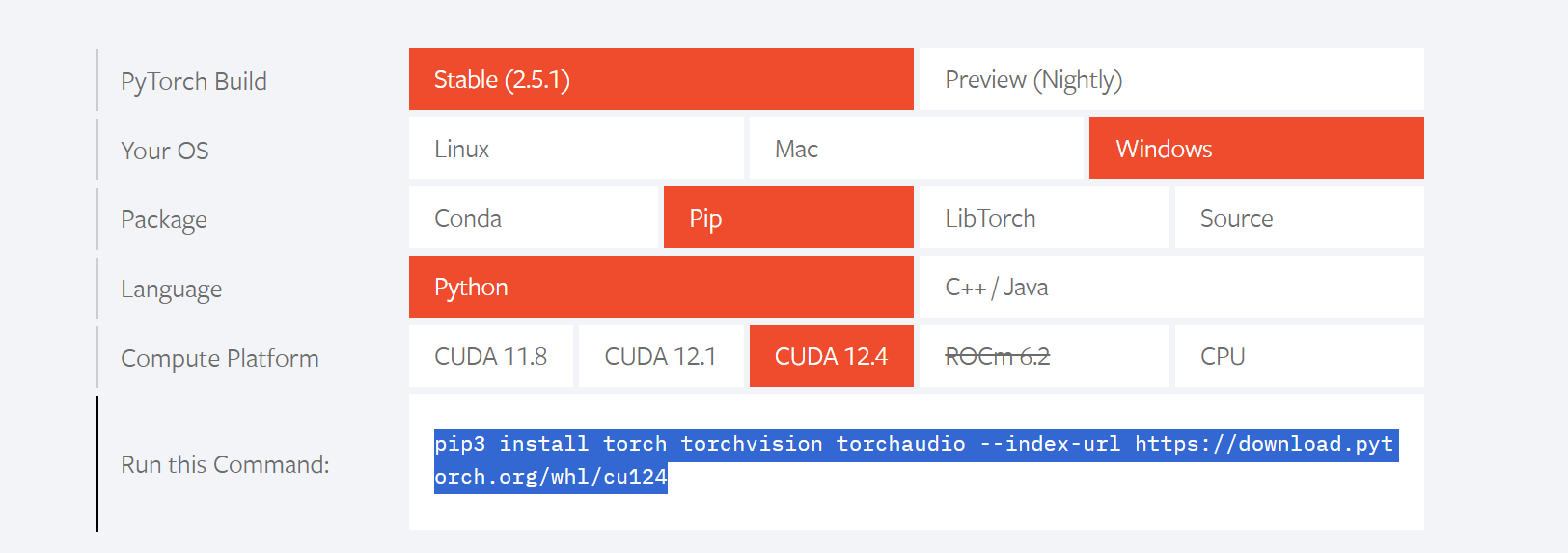
  • 使用pip安装torch,去官网查看
    • picture 4
    • pip3 install torch torchvision torchaudio --index-url https://download.pytorch.org/whl/cu124
  • 使用conda安装,可能因为不清楚的原因导致torch.cuda.is_available()返回False,使用pip安装解决问题
    • 安装过程中,使用命令conda install pytorch torchvision torchaudio pytorch-cuda=12.4 -c pytorch -c nvidia可能因为网络(或者服务器)原因报错链接失败,此时关闭代理即可成功
    • 使用pip安装成功,并且可以使用cuda
    • picture 5

教程手册

莫烦 https://mofanpy.com/tutorials/machine-learning/reinforcement-learning/

pytorch中文手册

https://handbook.pytorch.wiki/

转移到GPU上训练

  • 参考
  • 参考2
  • 主要操作是判断系统是否支持GPU训练并且指定设备device
    device = torch.device("cuda:0" if torch.cuda.is_available() else "cpu") # 设置使用GPU计算
  • 对创建的模型执行module.to(device)
  • 对创建的torch.tensor()也执行.to(device)
  • 注意,CPU上的参数只能和CPU上的参数互相运算,GPU上的参数只能和GPU上的参数互相计算,不能混杂,混杂的时候需要都迁移到GPU上计算或者都迁移到CPU上计算
  • 假如网络已经迁移到了GPU上,那么网络的输入参数也需要是GPU上的Tensor,输出也是GPU的

detach函数

https://blog.csdn.net/qq_31244453/article/details/112473947

返回一个新的tensor,从当前计算图中分离下来。但是仍指向原变量的存放位置,不同之处只是requirse_grad为false.得到的这个tensir永远不需要计算器梯度,不具有grad.

某博主的DDPG

https://blog.csdn.net/blanokvaffy/article/details/86232658

网络保存与加载

https://blog.csdn.net/weixin_41680653/article/details/93768559

torch.mean()

mean()函数的参数:dim=0,按行求平均值,返回的形状是(1,列数);dim=1,按列求平均值,返回的形状是(行数,1),默认不设置dim的时候,返回的是所有元素的平均值。

torch的zero_grad()函数

调用backward()函数之前都要将梯度清零,因为如果梯度不清零,pytorch中会将上次计算的梯度和本次计算的梯度累加

torch tensor的view函数

view(*args) → Tensor
返回一个有相同数据但大小不同的tensor。 返回的tensor必须有与原tensor相同的数据和相同数目的元素,但可以有不同的大小。

参数是-1的时候这个维度的长度从其他维度推算

torch tensor的 sequeeze和unsqueeze

squeeze():

squeeze(arg)表示第arg维的维度值为1,则去掉该维度。否则tensor不变。(即若tensor.shape()[arg] = 1,则去掉该维度)

unsqueeze():

unsqueeze(arg)squeeze(arg)作用相反,表示在第arg维增加一个维度值为1的维度。

matplotlib画图的时候出现横坐标标签重叠的问题

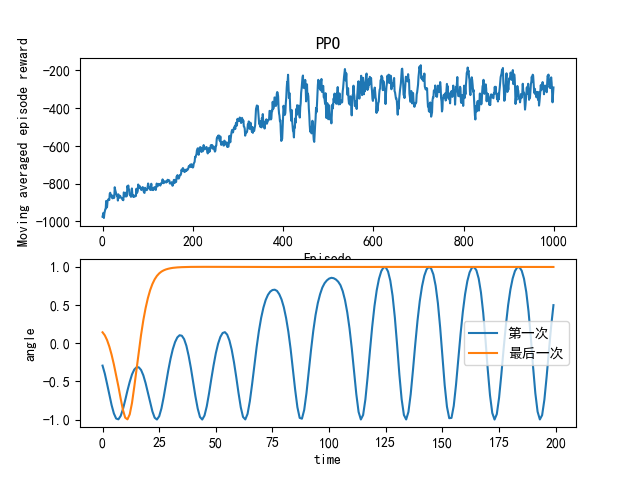
  • 比如picture 1

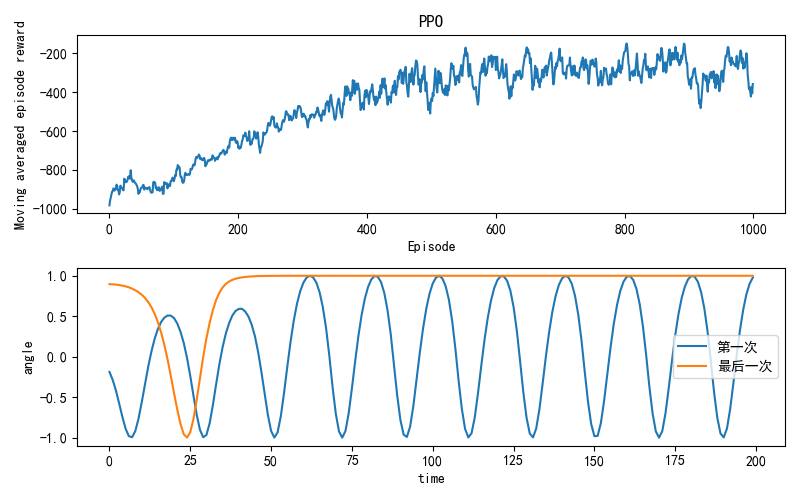
  • 只需要在代码中加入plt.tight_layout()即可(在plt.show()之前)

  • picture 2

    matplotlib添加希腊字母的latex方法

  • plt.ylabel("cos("+r'$\theta$'+")"),希腊字母用r'$\希腊字母$'即可

  • 效果:picture 3

将gym的输出保存为gif动画

def saveAsGIF(frames):
patch = plt.imshow(frames[0])
plt.axis("off")

def animate(i):
patch.set_data(frames[i])

anim = animation.FuncAnimation(plt.gcf(), animate, frames=len(frames), interval=5)
anim.save("./CartPole_v1_result.gif", writer="pillow", fps=30)
  • 此外,还需要在创建gym环境的时候进行一些操作(此处新版的gym和旧版的不太相同
    env = gym.make('Pendulum-v1', render_mode="rgb_array")
    frames = []
    for i in range(N):
    frames.append(env.render())
  • 然后再将frames当作参数传入前面的函数saveAsGIF()
  • picture 5

    python中的@

  • 参考链接

    python中的None

  • 参考链接
    • 就是空对象,无类型

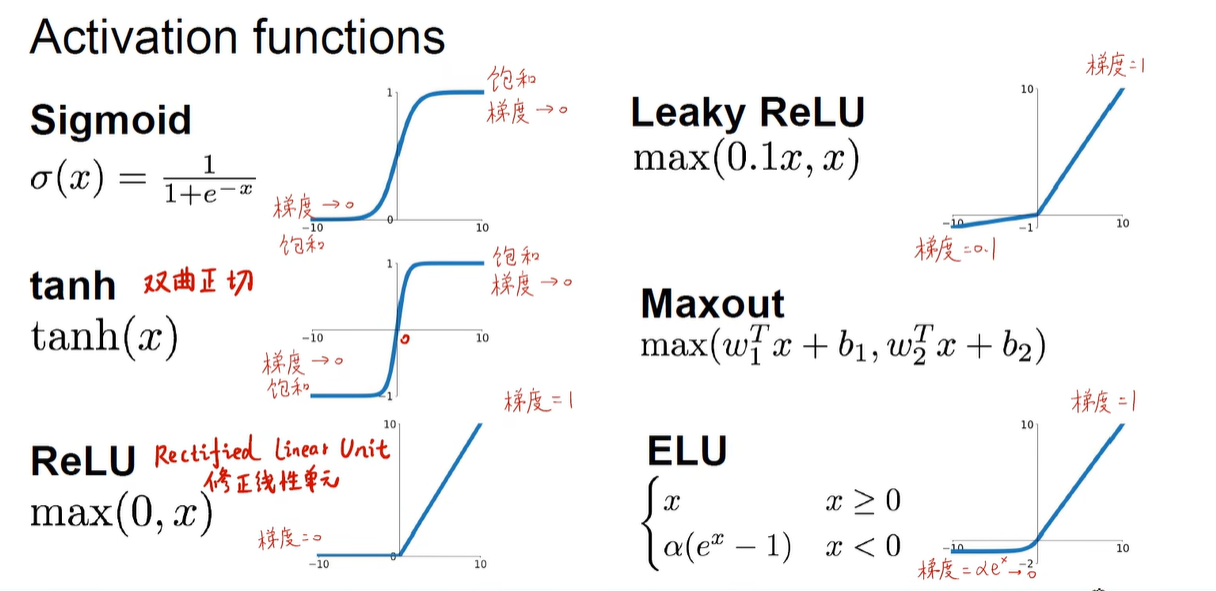
      各种激活函数

  • 激活函数
  • 其他的激活函数(比如Leaky ReLU
    • picture 1

      梯度消失问题

  • 参考链接1
  • 参考链接2
  • 简而言之就是比如使用sigmoid函数作为激活函数,因为sigmoid函数的梯度小于1,导致随着反向传播的层数加深,往前的层因为连乘的sigmoid函数导数次数过多,使得梯度越来越小,实际上起不到任何的训练效果,网络实际有效的只有靠后的几层
  • 也有其他方法来解决梯度消失的问题,比如ResNET等等

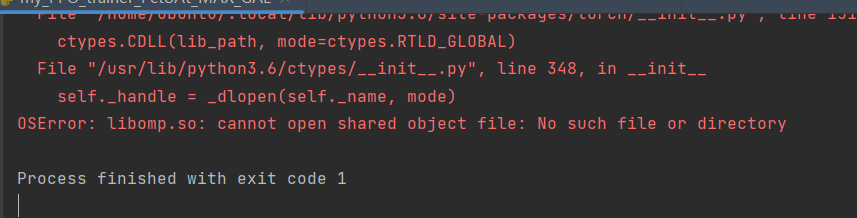
    Jetson开发板上找不到libomp.so文件的解决办法

  • 在Jetson开发板上安装pytorch之后,import pytorch的时候报错找不到libomp.so文件
    • picture 2
  • 但是同样的代码在命令行手动使用python3 <文件名>可以执行
  • 此时可以通过安装sudo apt-get install libomp5 libomp-dev解决,参考

    python实现命令行进度条

  • 参考

    python从图片生成gif

  • 参考

TD3网络

  • TD3是Twin Delayed Deep Deterministic policy gradient algorithm的简称,双延迟深度确定性策略梯度

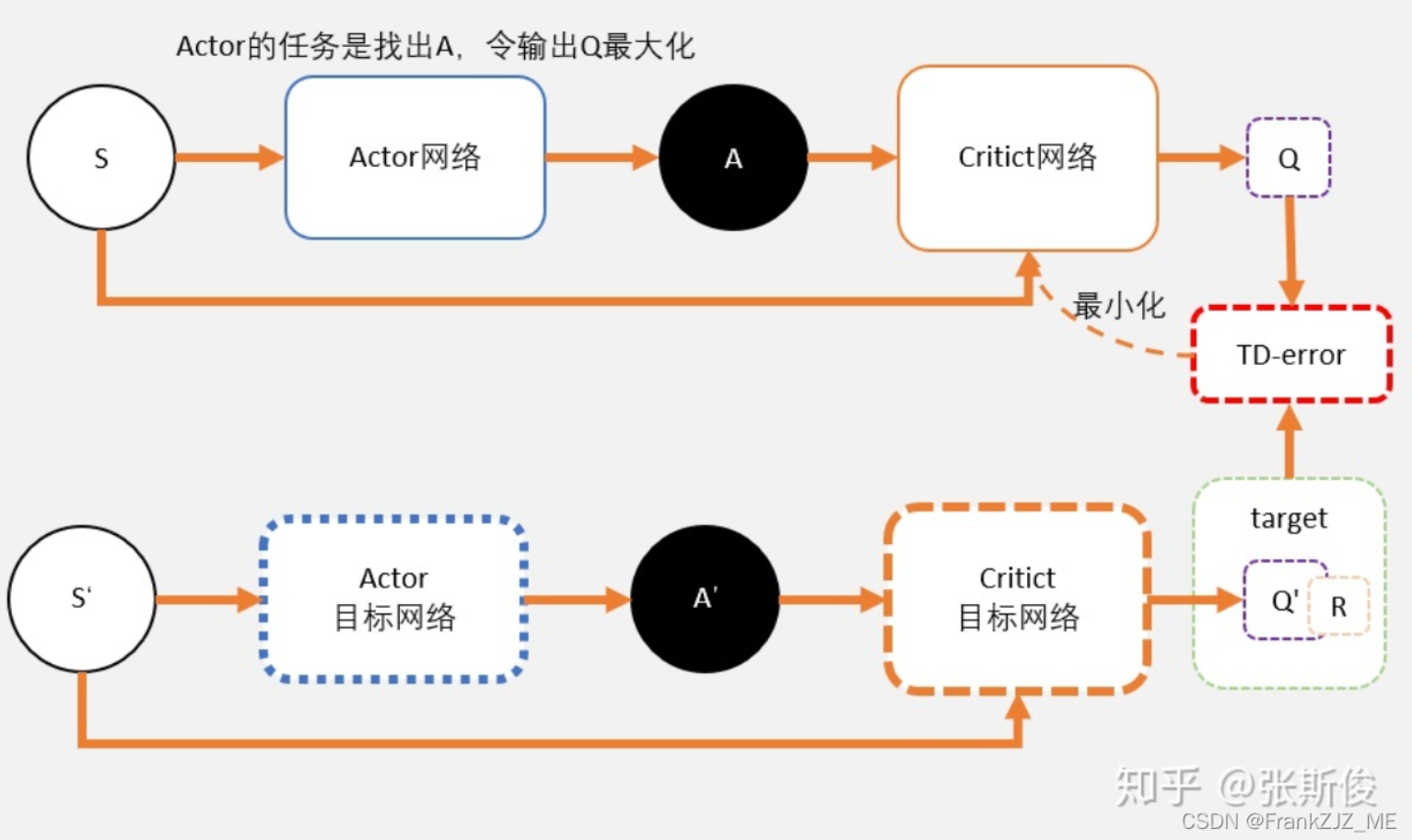
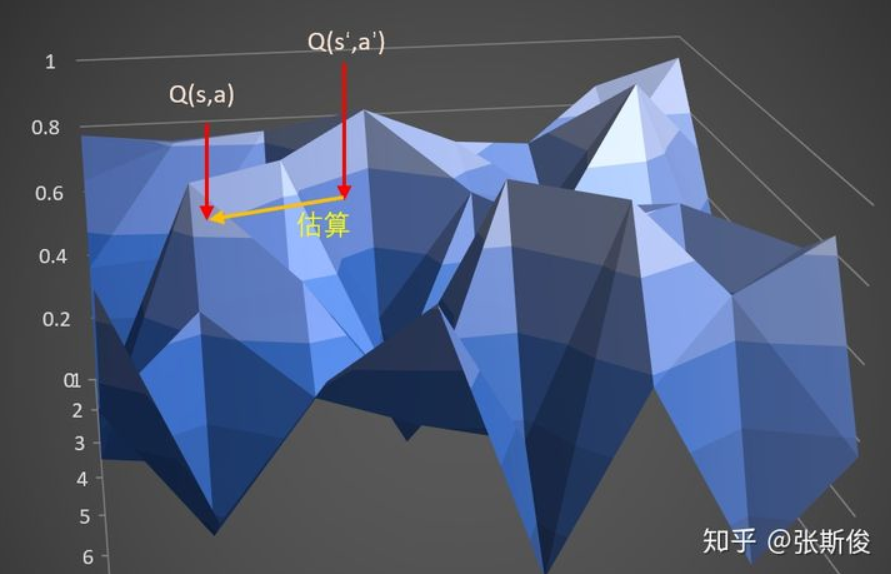
    传统的DDPG:

    image-20211208213332139

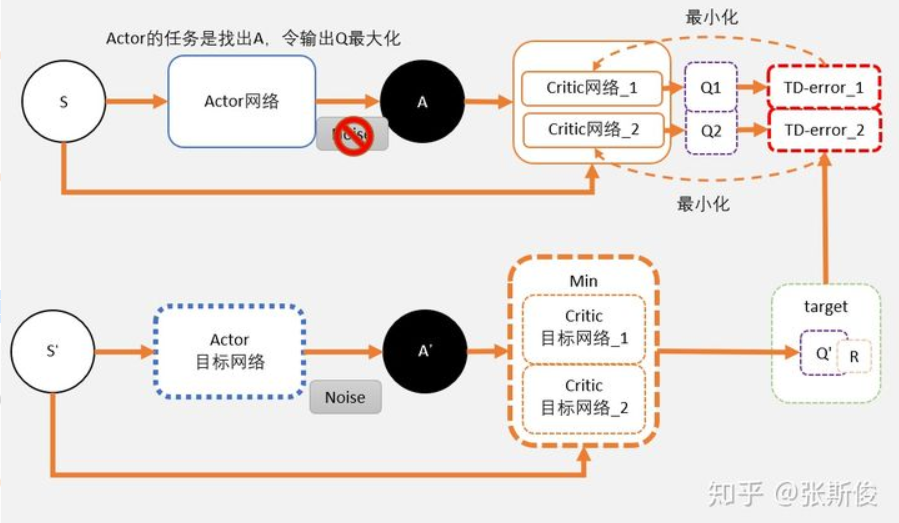
关注上图中,我们通过Critic网络估算动作的A值。一个Critic的评估可能会较高。所以我们加一个。

image-20211208213403185

这就相当于我们把途中的Critic的框框,一个变为两个。

在目标网络中,我们估算出来的Q值会用min()函数求出较少值。以这个值作为更新的目标。

这个目标会更新两个网络 Critic网络_1 和 Critic网络_2。

你可以理解为这两个网络是完全独立,他们只是都用同一个目标进行更新。

剩余的就和DDPG一样了。过一段时间,把学习好的网络赋值给目标网络。

我们再仔细分别看Critic部分和Actor部分的学习。

Critic部分的学习

只有我们在计算Critic的更新目标时,我们才用target network。其中就包括了一个Policy network,用于计算A’;两个Q network ,用于计算两个Q值:Q1(A’) 和Q2(A’)。

Q1(A’) 和Q2(A’) 取最小值 min(Q1,Q2) 将代替DDPG的 Q(a’) 计算更新目标,也就是说: target = min(Q1,Q2) * gamma + r

target 将会是 Q_network_1 和 Q_network_2 两个网络的更新目标。

这里可能会有同学问,既然更新目标是一样的,那么为什么还需要两个网络呢?

虽然更新目标一样,两个网络会越来越趋近与和实际q值相同。但由于网络参数的初始值不一样,会导致计算出来的值有所不同。所以我们可以有空间选择较小的值去估算q值,避免q值被高估。

Actor部分的学习

我们在DDPG中说过,DDPG网络图像上就可以想象成一张布,覆盖在qtable上。当我们输入某个状态的时候,相当于这块布上的一个截面,我们我们能够看到在这个状态下的一条曲线。

而actor的任务,就是用梯度上升的方法,寻着这条线的最高点。

对于actor来说,其实并不在乎Q值是否会被高估,他的任务只是不断做梯度上升,寻找这条最大的Q值。随着更新的进行Q1和Q2两个网络,将会变得越来越像。所以用Q1还是Q2,还是两者都用,对于actor的问题不大。

Delayed - 延迟

这里说的Dalayed ,是actor更新的delay。也就是说相对于critic可以更新多次后,actor再进行更新。

为什么要这样做呢?

还是回到我们qnet拟合出来的那块”布”上。

qnet在学习过程中,我们的q值是不断变化的,也就是说这块布是不断变形的。所以要寻着最高点的任务有时候就挺难为为的actor了。

可以想象,本来是最高点的,当actor好不容易去到最高点;q值更新了,这并不是最高点。这时候actor只能转头再继续寻找新的最高点。更坏的情况可能是actor被困在次高点,没有找到正确的最高点。

所以我们可以把Critic的更新频率,调的比Actor要高一点。让critic更加确定,actor再行动。

target policy smoothing regularization

TD3中,价值函数的更新目标每次都在action上加一个小扰动,这个操作就是target policy smoothing regularization

为什么要这样呢?

我们可以再次回到我们关于“布”的想象。

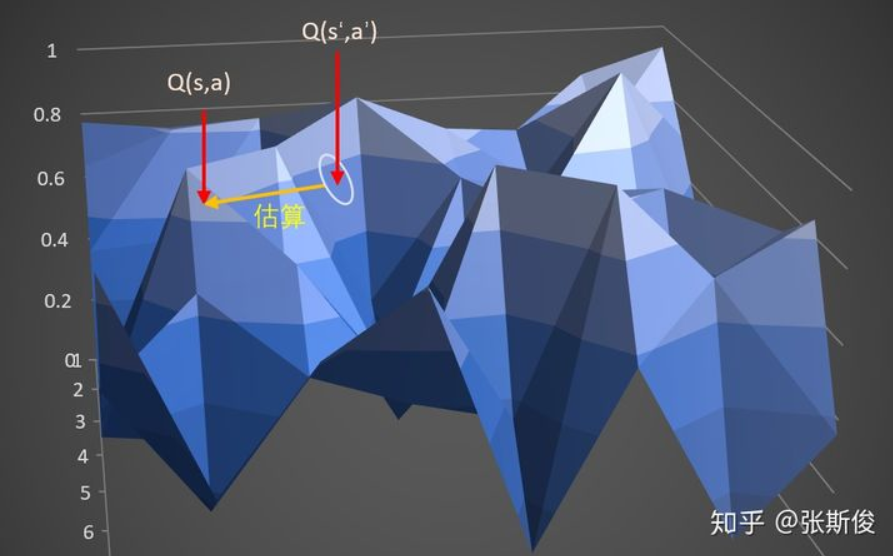
在DDPG中,计算target的时候,我们输入时s_和a_,获得q,也就是这块布上的一点A。通过估算target估算另外一点s,a,也就是布上的另外一点B的Q值。
image-20211208213605697

在TD3中,计算target时候,输入s_到actor输出a后,给a加上噪音,让a在一定范围内随机。这又什么好处呢。

好处就是,当更新多次的时候,就相当于用A点附近的一小部分范围(准确来说是在s_这条线上的一定范围)的去估算B,这样可以让B点的估计更准确,更健壮。

image-20211208213632464

  • 这注意区分三个地方:

​ 在跑游戏的时候,我们同样加上了了noise。这个时候的noise是为了更充分地开发整个游戏空间。
​ 计算target的时候,actor加上noise,是为了预估更准确,网络更有健壮性。
​ 更新actor的时候,我们不需要加上noise,这里是希望actor能够寻着最大值。加上noise并没有任何意义。

下面附上源代码

import gym
import math
import random
import numpy as np
import matplotlib.pyplot as plt
import torch
import torch.nn as nn
import torch.nn.functional as F
import torch.optim as optim
import os
'''迁移到了GPU上进行训练'''

class Actor(nn.Module):
def __init__(self, input_size, hidden_size, output_size):
super(Actor, self).__init__()
self.linear1 = nn.Linear(input_size, hidden_size)
self.linear2 = nn.Linear(hidden_size, hidden_size)
self.linear3 = nn.Linear(hidden_size, hidden_size)
self.linear4 = nn.Linear(hidden_size, output_size)
def forward(self, s):
x = F.relu(self.linear1(s))
x = F.relu(self.linear2(x))
x = F.relu(self.linear3(x))
x = torch.tanh(self.linear4(x))

return x


class Critic(nn.Module):
def __init__(self, input_size, hidden_size, output_size):
super().__init__()
self.linear1 = nn.Linear(input_size, hidden_size)
self.linear2 = nn.Linear(hidden_size, hidden_size)
self.linear3 = nn.Linear(hidden_size, hidden_size)
self.linear4 = nn.Linear(hidden_size, output_size)

def forward(self, s, a):
x = torch.cat([s, a], 1)
x = F.relu(self.linear1(x))
x = F.relu(self.linear2(x))
x = F.relu(self.linear3(x))
x = self.linear4(x)

return x


class Agent(object):
def __init__(self, **kwargs):
for key, value in kwargs.items():
setattr(self, key, value)

s_dim = self.env.observation_space.shape[0]
a_dim = self.env.action_space.shape[0]
fileList = os.listdir('nets/')
if "actor.pkl" in fileList :
print("Trained nets found!")

self.actor = torch.load('nets/actor.pkl')
self.actor_target = torch.load('nets/actor_target.pkl')

self.critic1 = torch.load('nets/critic1.pkl')
self.critic_target1 = torch.load('nets/critic_target1.pkl')
self.critic2 = torch.load('nets/critic2.pkl')
self.critic_target2 = torch.load('nets/critic_target2.pkl')
else:
print("Trained nets not found!")

self.actor = Actor(s_dim, 256, a_dim).cuda()
self.actor_target = Actor(s_dim, 256, a_dim).cuda()

self.critic1 = Critic(s_dim + a_dim, 256, 1).cuda() # 此处修改了critic的输出维度恒为1
self.critic_target1 = Critic(s_dim + a_dim, 256, 1).cuda() # 此处修改了critic的输出维度恒为1
self.critic2 = Critic(s_dim + a_dim, 256, 1).cuda() # 此处修改了critic的输出维度恒为1
self.critic_target2 = Critic(s_dim + a_dim, 256, 1).cuda() # 此处修改了critic的输出维度恒为1
# 假如没找到存在的网络的话,初始化target网络
self.actor_target.load_state_dict(self.actor.state_dict())

self.critic_target1.load_state_dict(self.critic1.state_dict())
self.critic_target2.load_state_dict(self.critic2.state_dict())

self.actor_optim = optim.Adam(self.actor.parameters(), lr=self.actor_lr)
self.critic_optim1 = optim.Adam(self.critic1.parameters(), lr=self.critic_lr)
self.critic_optim2 = optim.Adam(self.critic2.parameters(), lr=self.critic_lr)
self.buffer = []
self.updateCnt = 0


def act(self, s0):
s0 = torch.tensor(s0, dtype=torch.float).cuda().unsqueeze(0).cuda()
a0 = self.actor(s0).squeeze(0).detach().cpu().numpy()
return a0

def put(self, *transition):
if len(self.buffer) == self.capacity:
self.buffer.pop(0)
self.buffer.append(transition)

def learn(self):
if len(self.buffer) < self.batch_size:
return

samples = random.sample(self.buffer, self.batch_size)


s0, a0, r1, s1 = zip(*samples)

s0 = torch.tensor(s0, dtype=torch.float).cuda()
a0 = torch.tensor(a0, dtype=torch.float).cuda()
r1 = torch.tensor(r1, dtype=torch.float).view(self.batch_size, -1).cuda()
s1 = torch.tensor(s1, dtype=torch.float).cuda()

def critic_learn():
a1 = self.actor_target(s1).detach()
y_true = r1 + self.gamma * torch.min(self.critic_target1(s1, a1), self.critic_target1(s1, a1)).detach()
# 更新网咯1
y_pred1 = self.critic1(s0, a0)
loss_fn = nn.MSELoss()
loss = loss_fn(y_pred1, y_true)
self.critic_optim1.zero_grad()
loss.backward()
self.critic_optim1.step()
# 更新网络2
y_pred2 = self.critic2(s0, a0)
loss_fn = nn.MSELoss()
loss = loss_fn(y_pred2, y_true)
self.critic_optim2.zero_grad()
loss.backward()
self.critic_optim2.step()

def actor_learn():
# 此处update actor网络同样从两个critic网络中选择一个较小的
loss = -torch.mean(torch.min(self.critic1(s0, self.actor(s0)), self.critic2(s0, self.actor(s0))))
self.actor_optim.zero_grad()
loss.backward()
self.actor_optim.step()

def soft_update(net_target, net, tau):
for target_param, param in zip(net_target.parameters(), net.parameters()):
target_param.data.copy_(target_param.data * (1.0 - tau) + param.data * tau)

critic_learn()
soft_update(self.critic_target1, self.critic1, self.tau)
soft_update(self.critic_target2, self.critic2, self.tau)
self.updateCnt += 1
# 到达更新频率的时候才更新actor
if((self.updateCnt % self.update_interval) == 0):
actor_learn()
soft_update(self.actor_target, self.actor, self.tau)


def save(self):
torch.save(self.actor, 'nets/actor.pkl')
torch.save(self.actor_target, 'nets/actor_target.pkl')
torch.save(self.critic1, 'nets/critic1.pkl')
torch.save(self.critic_target1, 'nets/critic_target1.pkl')
torch.save(self.critic2, 'nets/critic2.pkl')
torch.save(self.critic_target2, 'nets/critic_target2.pkl')

env = gym.make('Pendulum-v1')
env.reset()
env.render()

params = {
'env': env,
'gamma': 0.99,
'actor_lr': 0.001,
'critic_lr': 0.0013,
'tau': 0.02,
'capacity': 5000,
'batch_size': 32,
'update_interval': 3,
}
EPOCH_NUM = 200
agent = Agent(**params)
FLAG = False
rewardList = []
# INTCOEFF = 0.001
integral = 0
# INTCOEFF = 0.0
for episode in range(EPOCH_NUM):
s0 = env.reset()
episode_reward = 0
if(episode%20 == 0):
flag = True
else:
flag = False
integral = 0
INTCOEFF = (episode/EPOCH_NUM)**2*0.005
for step in range(500):
if(flag):
env.render()
a0 = agent.act(s0)
s1, r1, done, _ = env.step(a0)
integral += r1*INTCOEFF
agent.put(s0, a0, r1+integral, s1)

episode_reward += r1
s0 = s1

agent.learn()

print(episode, ': ', episode_reward)
rewardList.append(episode_reward)
pltX = [i for i in range(EPOCH_NUM)]
plt.plot(pltX, rewardList)
plt.show()
# agent.save()

详见DDPG_Try: DDPG尝试集 (gitee.com)

安装nodeJS以及hexo框架的踩坑笔记

详细入门网站

  • 版本问题:
    一开始使用的是最新版本的NodeJS然后安装完成Hexo之后发现不能在控制台使用hexo init blog,显示hexo不是命令。
    然后使用HodeJS12.0.0,自带npm,安装完成(注意不要使用13等版本,npm不是支持每个nodeJS版本)
  • 假如直接git clonehexo的仓库报错的话可能是换设备之后 无法通用 ,还是需要在 原设备 上才能打的开image-20211214003223898
  • 假如重装hexo失败的话,删除图中文件夹下的hexo有关的所有内容image-20211208201712068
  • 安装完成之后在控制台输入以下代码,假如没有报错而且能够正确显示版本号的话说明安装成功
    node -vnpm -v
  • 另注意,假如安装完nodeJS之后,输入node -v得到的版本和安装的 不同 ,此时需要将NodeJS卸载然后安装在 默认的安装位置 。注意,AMD CPU的计算机下载x86的,Intel的下载x64的msi安装文件
  • 插入图片问题
    有时候插入的图片会加载失败比如显示为 2,此时可以通过以下几步解决问题

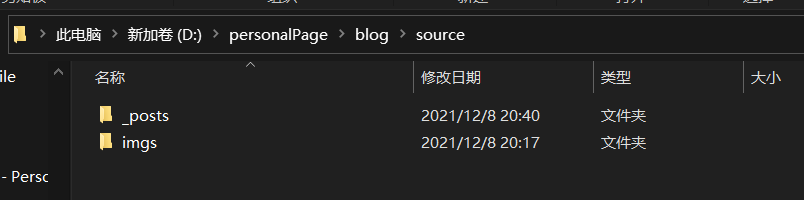
  • 首先,在source目录下新建一个文件夹比如imgs

    image-20211208204226807

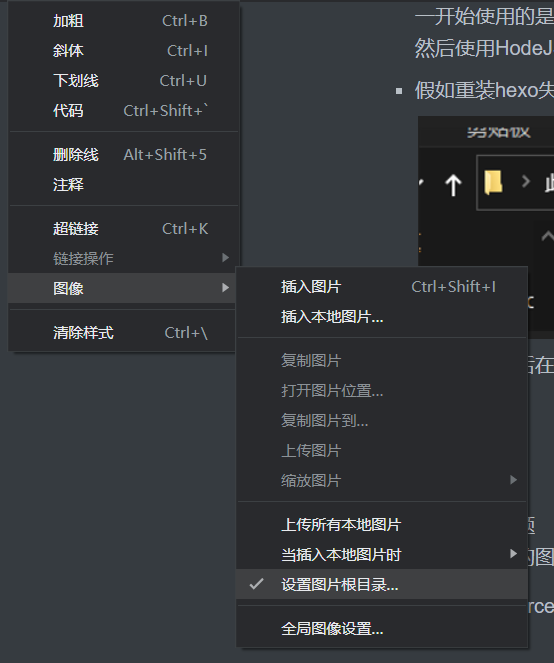
    然后把typora的根目录设置为source

    image-20211208204322540

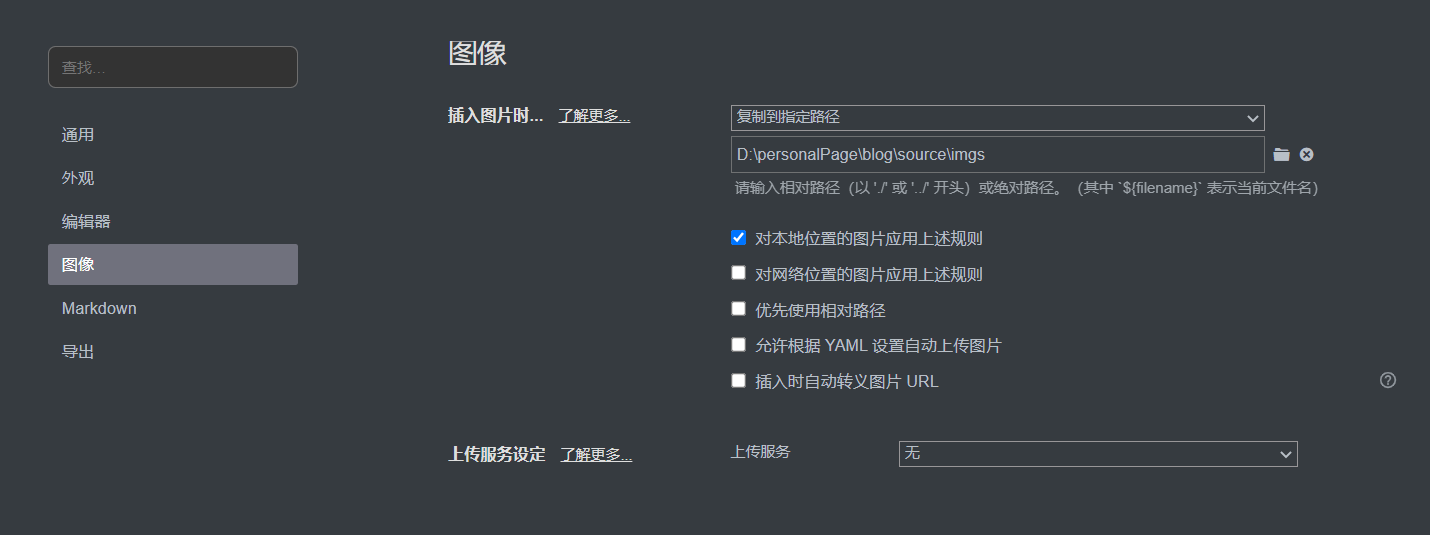
    然后设置将图片复制到imgs下

    image-20211208204358165

    配置好上述功能之后,直接把用到的图片从剪贴板复制到typora即可

    不要安装网上博客说的插件,安装之后可能无法启动网站

    不需要在config中开启每新建一篇博客就新建一个文件夹之类的选项,反而更麻烦

  • 修改主题
    从github将主题项目 git clone到blogs的 \themes\<主题名称>文件夹,然后将总目录下的 _config.yml中的 theme更换为<主题名称>
    假如无法clone的话,可以将项目打包下载然后解压到同样的文件夹中即可

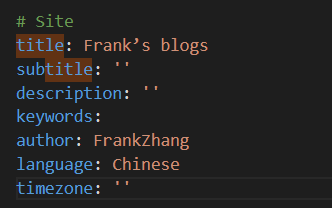
  • 设置个人信息如下图
    3

  • 此外,在主题的配置文件中(也是 _config.yml)也有一些可以修改的地方,可以自己动手改一改

  • 在推送网站之前需要安装一个git配合插件
    npm install hexo-deployer-git --save

hexo部署的踩坑

  • 部署的时候不能在/sources下执行hexo clean, hexo g等脚本,需要在博客的根目录下执行脚本,否则会导致博客部分内容不更新(比如tags),引起新创建的tags不读取和无法打开含有对应tags的文章的问题
  • 一键部署的脚本
    • 此脚本运行的时候将自己的位置切换到了自己所在位置的上一级目录
    • 执行结束后会自动切回去
      # Set the error preference to stop the script on any command failure
      $ErrorActionPreference = 'Stop'

      # Save the current working directory
      $originalLocation = Get-Location

      # Change directory to the parent directory of the script's directory
      Set-Location (Join-Path $PSScriptRoot "..")

      try {
      # Define a function to execute a command and check if it was successful
      function Invoke-HexoCommand {
      param(
      [string]$Command
      )
      Write-Host "Executing command: $Command" -ForegroundColor Cyan
      Invoke-Expression $Command
      }

      # Execute Hexo commands
      Invoke-HexoCommand "hexo clean"
      Invoke-HexoCommand "hexo g"
      Invoke-HexoCommand "hexo d"

      # Print the new working directory to confirm
      Write-Host "Current working directory is now: $(Get-Location)"
      # Command execution completed message
      Write-Host "Hexo site cleaning, generation, and deployment completed." -ForegroundColor Green -BackgroundColor White
      } catch {
      # Handle exceptions here if needed
      Write-Host "An error occurred: $_" -ForegroundColor Red
      } finally {
      # Restore the original working directory
      Set-Location $originalLocation
      Write-Host "Returned to the original directory: $originalLocation"
      }

更换设备

  • 注意更换设备的时候不能简单的git clone,这样的话是无法打开的。只能自己在本地新建一个博客,然后将sourcethemes以及config文件和文件夹都 复制进去

部署的地址

  • 部署的时候 不能使用 网页上的教程repo地址如图

image-20211209101305939

需要直接写成自己的仓库地址+.git,比如

image-20211209101336927

  • 此外,相关的 url和root 配置如下;

image-20211209101427432

即可正常显示

向服务器提交过程

hexo clean

hexo g

hexo d

gitee网站教程

https://gitee.com/help/articles/4136#article-header0

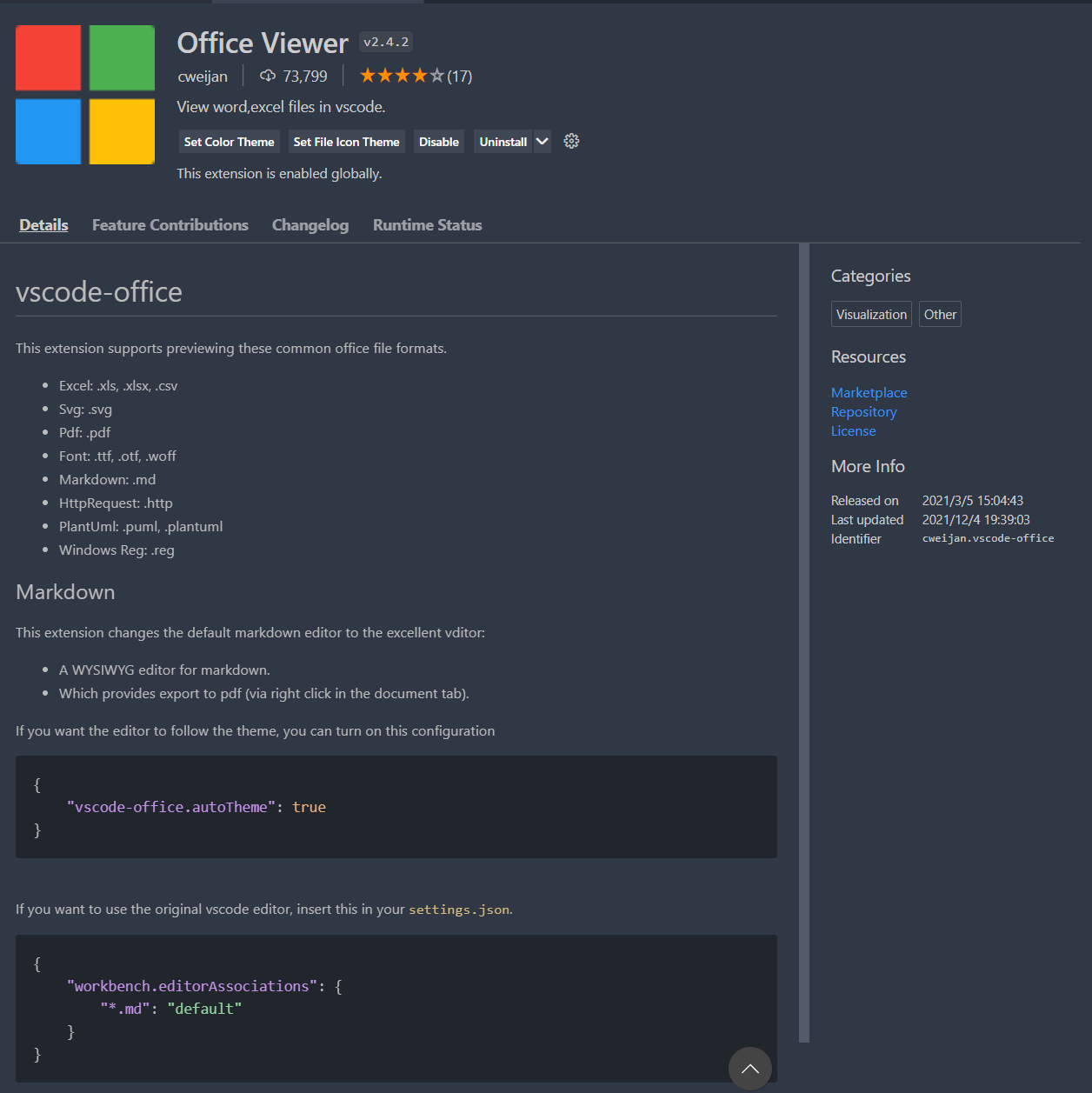
vscode markdown插件(相对方便,但是不支持图片复制,建议还是用typora)

office viewer

4


使用next主题

  • 教程
  • 添加字数统计
  • 注意博客的语言(也就是根目录下_config.yml的language)要写成zh-CNpicture 0
    否则语言会出错
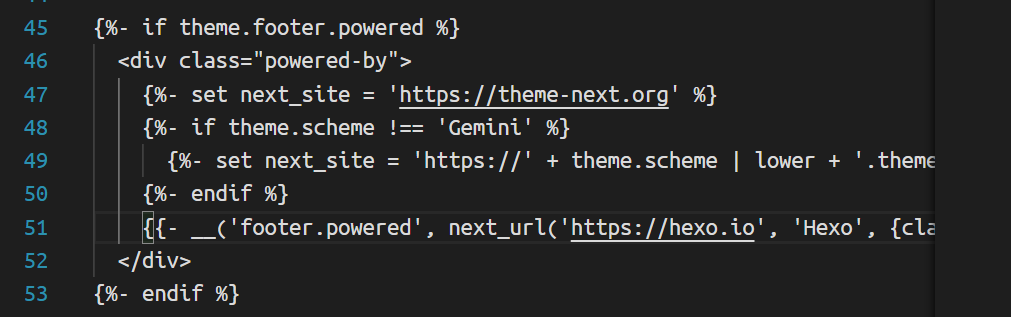
  • 删除页面底部由…强力驱动
    • picture 1
    • 将如图的45-53行删除
  • 有时候文章底部会不显示访问人数等,只有一条竖线,此时是因为开了代理导致的,关闭即可正常显示picture 2
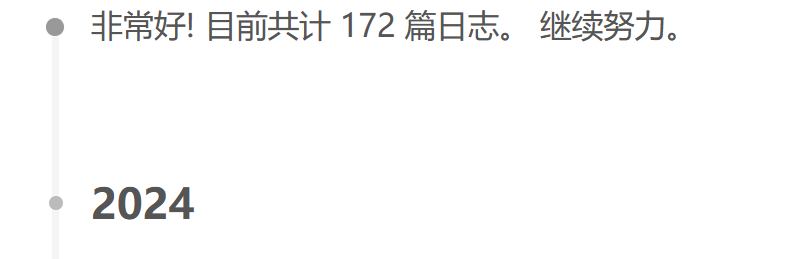
  • 如何不显示非常好! 目前共计 *** 篇日志。 继续努力。picture 3
    • 按Ctrl+P搜索archive.swig
    • 注释掉第31行picture 4
    • 使用<!---->
  • 更换网站图标
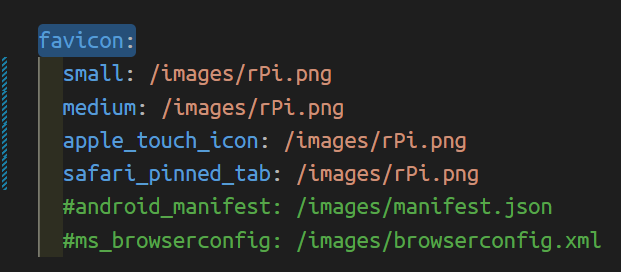
    • next主题的_config.yml中搜索favicon:
    • picture 5
    • 配置为themes/next/source/images下的图片即可