Mp4视频文件相关信息的取得
- 使用 MediaSource 搭建流式播放器
- 参考2
- 参考3
- MP4文件具有几个关键的信息用于流式传输
- AVCProfileIndication
- profile_compability
- AVCLevelIndication
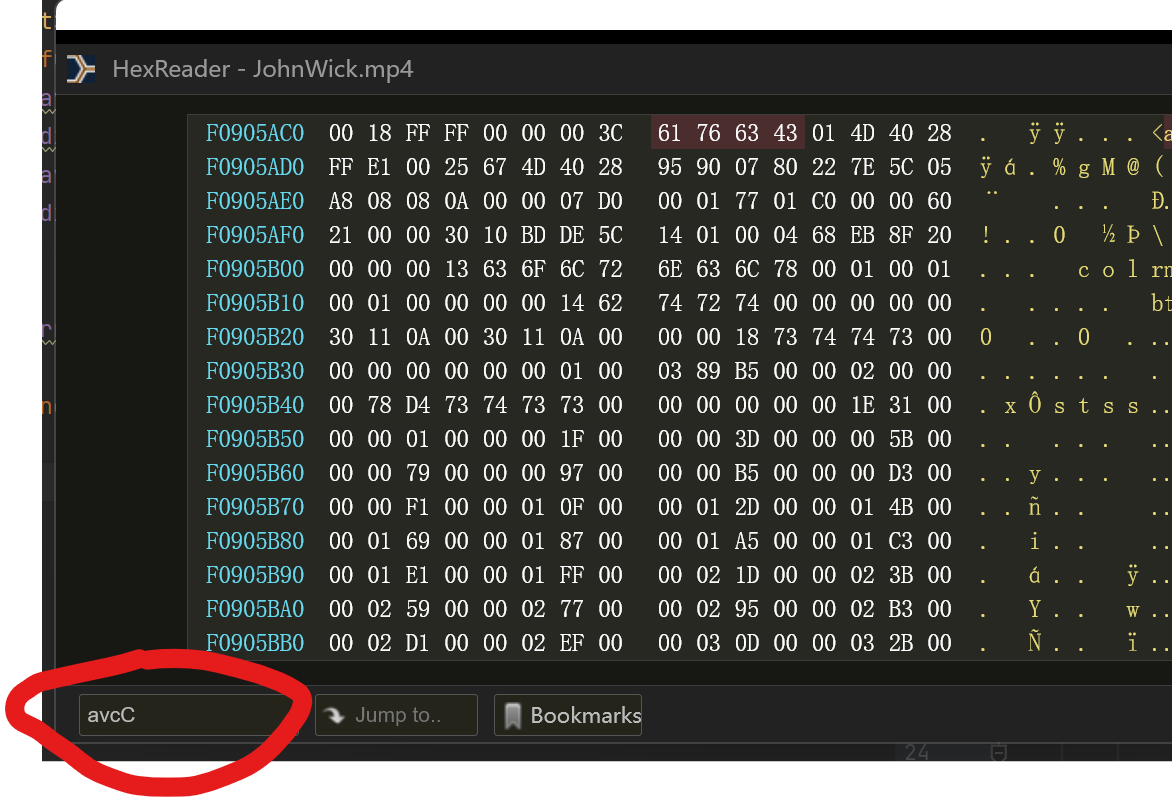
- 使用十六进制文件浏览器读取MP4文件,chrome有相关插件HexReader
- 打开之后搜索
avcC - 其后紧跟的第一个是
configurationVersion,后面三个就是AVCProfileIndication,profile_compatibility和AVCLevelIndication三个十六进制数字比如本文中是4D,40和28python读取部分文件并且使用生成器
- 参考
- 生成器参考
def chunked_file_reader(block_size=5*1024*1024):
    """生成器函数:分块读取文件内容
    """
    fp = open("文件地址", 'rb')
    while True:
        chunk = fp.read(block_size)
        # 当文件没有更多内容时,read 调用将会返回空字符串 ''
        if not chunk:
            break
        yield chunk
后端FLask和前端JS
- 参考
- 里面
mime部分需要利用上文的方法进行一定的修改 - 但是直接参考样例撰写会遇到问题如图(更正上述参数之后)
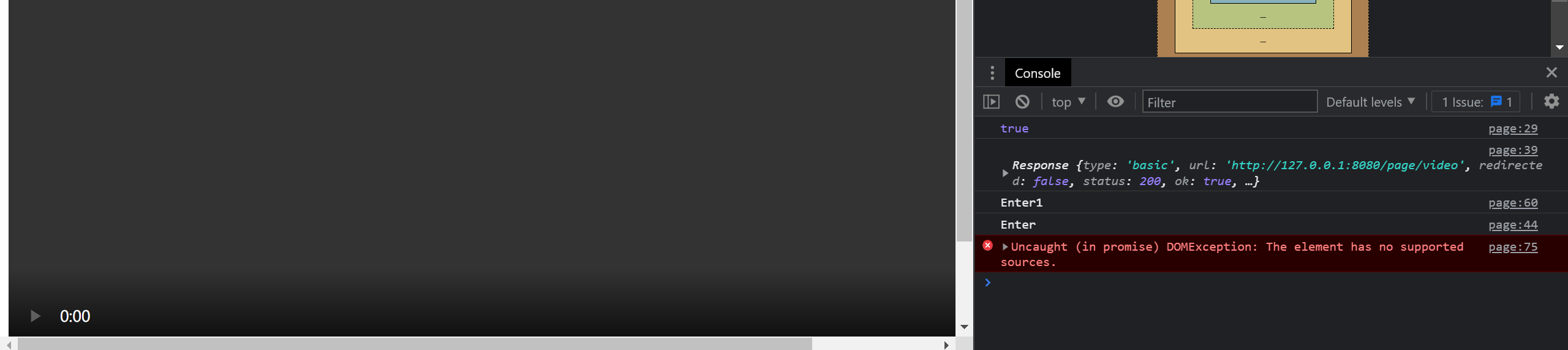
- video标签的一些性质
- Audio/Video的各种事件
- mediaSource参考
- fetch参考
- mediaSource中文详细参考 知乎
- 微软MSE教程(最终修改的基础)
- 一个全面的参考
- 最终仍然没有解决,可能是MP4格式不支持导致的
webm格式
比如网上例子中的
video/webm; codecs="vorbis,vp8"微软自带的剪辑工具(难用)
-
最终方案与代码逻辑
JS的代码分同步和异步执行,异步执行的代码在时间上与其他代码的先后顺序是独立的。
同步执行的代码可能因为多线程的原因,并、不是严格的按照前后顺序执行的,这可能导致一些问题
因此需要设法控制代码的执行时序和时机
setTimeOut是异步的sourceBuffer的appendBuffer也是异步的
通过事件和
addEventListener控制代码的执行顺序和时机执行顺序
video控件加载的时候
mediaSource触发sourceopen事件sourceopen实现对于initVideo的调用initVideo中添加对于SourceBuffer的updateend事件的监听,该事件表示buffer中append操作已经结束,可以进一步添加或者进行其他操作,通过这个事件监听器调用playSegment。这个事件发生的时候SourceBuffer的updating变为False表示添加完成为了应对某些场合因为
sourceBuffer满导致无法继续加载的情况,会将sourceBuffer中的内容全部删除,重新从需要的位置开始缓存加载,假如网速够快的话这个时间忽略不计,因为是从需要的位置开始加载的,一些技巧
可以在某个函数的调用函数中添加调用这个函数的事件监听器,同时在这个函数本身中删除调用这个函数的事件监听器,否则会导致这个函数在事件发生的时候被反复调用
系统自动提前调用了
endOfStream导致readyState变成ended,使得系统无法继续加载- 可能是视频源导致的
webm存在这类问题,但是mp4没有,然而mp4始终无法播放只能用webm,此时可以适当修改webm的trunk分割方式参考 - 可以将
sourceended事件对象log出来看下调用的时间和情况
- 可能是视频源导致的
appendBuffer之前要判断
!videoSource.updating && mediaSource.readyState === "open"否则也会报错async和await异步处理
-
前后端源代码(v2.0)
后端
from flask import Flask
from flask import request
from flask import make_response
from flask import send_from_directory
from flask import send_file
from flask import Response
import os
import json
# def chunked_file_reader(block_size=5 * 1024 * 1024):
# """生成器函数:分块读取文件内容
# """
# fp = open("F:/JohnWick.mp4", 'rb')
# while True:
# chunk = fp.read(block_size)
# # 当文件没有更多内容时,read 调用将会返回空字符串 ''
# if not chunk:
# break
# yield chunk
app = Flask(__name__)
i = 0
segmentNum = 10
def streamVideo():
global i
fileStr = "D:/selfLearning/pyTrunk/JW2.webm"
# fileStr = "D:/selfLearning/pyTrunk/JWSmall.mp4"
size = os.stat(fileStr).st_size
dataReceived = json.loads(request.get_data())
fpStart = dataReceived['current']
print("index is ", fpStart)
fpSeek = int(size / segmentNum * fpStart)
fp = open(fileStr, 'rb')
fp.seek(fpSeek)
chunk = fp.read((int)(size / segmentNum))
# streamFile = chunked_file_reader()
# print("page is loading...")
# i=i+1
# response = Response(chunk, content_type="video/webm")
# return response
return make_response(chunk)
def returnSegmentNum():
returnDict = {}
returnDict['segments'] = segmentNum
return json.dumps(returnDict)
def returnPage():
return send_from_directory('', 'mainNew.html')
# def count_chunks(fname):
# count = 0
# with open(fname, 'rb') as fp:
# for chunk in chunked_file_reader(fp):
# count += 1
# return count
if __name__ == '__main__':
# print(count_chunks("F:/JohnWick.mp4"))
app.run(host="0.0.0.0", port=8080)前端(基于微软MSE和其他修改得到)
<html lang="en">
<head>
<script src="https://apps.bdimg.com/libs/jquery/2.1.4/jquery.min.js"></script>
<meta charset="UTF-8">
<!-- <title>Title</title>-->
</head>
<body>
<!--<video id="video" width="1024" height="768" src="page/video"></video>-->
<div class="a">
<video id="video" width="1024" height="768" preload="auto" controls loop="true"></video>
<br>
<!-- <input id="range" type="range" min="0" step="1" max="100" value="0" width="1024px" onmouseup="dragRange()"></input>-->
</div>
<script>
videoElement = document.getElementById("video");
var videoSource;
var index = 0;
var bufferIndex = 0;
// segments = 0;
currentPos = 0;
numOfSeg = 0;
var curIndex;
file = "page/video";
function getNumOfSeg() {
var ret;
$.ajax({
type: "GET",
url: "page/video/segment",
success: function (data) {
var dict = JSON.parse(data);
console.log("dict:", dict['segments']);
window.numOfSeg = dict['segments'];
}
})
}
setInterval(function () {
console.log("video State is", videoElement.readyState);
// if(videoElement.readyState<3)
// {
// playSegment();
// }
}, 1000);
setupVideo();
function setupVideo() {
getNumOfSeg();
// clearLog(); // Clear console log
bufferIndex = 0;
// Create the media source
if (window.MediaSource) {
mediaSource = new window.MediaSource();
} else {
console.log("mediasource or syntax not supported");
return;
}
if (videoElement.src) {
URL.revokeObjectURL(videoElement.src);
}
var url = URL.createObjectURL(mediaSource);
videoElement.pause();
videoElement.src = url;
// videoElement.width = width;
// videoElement.height = height;
// Wait for event that tells us that our media source object is
// ready for a buffer to be added.
videoElement.addEventListener('load', handleVideoLoad);
mediaSource.addEventListener('sourceopen', toInit, false);
mediaSource.addEventListener('sourceended', handleSourceEnd);
// Handler to switch button text to Play
// videoElement.addEventListener("pause", function () {
// playButton.innerText = "Play";
// }, false);
//
// // Handler to switch button text to pause
// videoElement.addEventListener("playing", function () {
// playButton.innerText = "Pause";
// }, false);
// // Remove the handler for the timeupdate event
// videoElement.addEventListener("ended", function () {
// videoElement.removeEventListener("timeupdate", checkTime);
// }, false);
}
function toInit(e) {
try {
console.log("toInit")
videoSource = mediaSource.addSourceBuffer('video/webm; codecs="vorbis,vp8"');
// videoSource = mediaSource.addSourceBuffer('video/mp4; codecs="avc1.4D2029, mp4a.40.2"');
setTimeout(initVideo, 500);
} catch (e) {
console.log('Exception calling addSourceBuffer for video', e);
return;
}
}
function initVideo() {
fetch("page/video",
{
method: "POST",
body: JSON.stringify({'current': index}),
// responseType: 'blob'
}).then(function (response) {
console.log(response);
console.log("init", index);
// console.log(index);
// return response.arrayBuffer();
// return response.blob();
return response.arrayBuffer();
})
.then(function (response) {
try {
// videoSource.appendBuffer(new Uint8Array(response));
// var sourceBuffer = mediaSource.sourceBuffers[bufferIndex];
// sourceBuffer.appendBuffer(response);
videoSource.appendBuffer(response);
index++;
// videoElement.play();
// index+=1;
// Wait for the update complete event before continuing
// mediaSource.endOfStream();
// videoSource.addEventListener("updateend", updateFunct, false);
videoElement.addEventListener("timeupdate", getStarted);
videoElement.play().then(function () {
}).catch(function (err) {
console.log(err)
});
} catch (e) {
console.log(e);
}
});
}
function updateFunct() {
// This is a one shot function, when init segment finishes loading,
// update the buffer flag, call getStarted, and then remove this event.
// bufferUpdated = true;
// videoSource.removeEventListener("updateend", updateFunct, false);
// Now that video has started, remove the event listener
// videoSource.removeEventListener("update", updateFunct);
// console.log(("updating..."));
getStarted(); // Get video playback started
}
function getStarted() {
// Start by loading the first segment of media
// 根据现在的播放进度决定是否进行加载
window.curIndex = Math.ceil(videoElement.currentTime / mediaSource.duration * window.numOfSeg);
// console.log("timeupdate", curIndex);
// if (index - curIndex > 0&& !(mediaSource.readyState === "HAVE_METADATA")) {
// return;
// }
// if (!videoSource.updating && mediaSource.readyState === "open") {
// if (index >= window.numOfSeg) {
// // mediaSource.endOfStream();
// console.log("ended!");
// // console.log(videoSource.sourceBuffers[0].length)
// // videoElement.play();
// // videoSource.removeEventListener("updateend", updateFunct);
// return;
// }
// // playSegment();
//
// }
console.log("curIndex index", curIndex, index);
// console.log(videoElement.buffered);
if (index - curIndex < 1 && index < window.numOfSeg) {
// console.log("updating");
setTimeout(playSegment, 100);
setTimeout(updateFunct, 300);
} else if (curIndex - index < -1 && (videoElement.readyState < 3)) {
videoElement.removeEventListener("timeupdate", getStarted);
setTimeout(handleVideoLoad, 50);
return;
}
// Start showing video time
// requestId = window.requestAnimationFrame(render);
// Display current index
// curIndex.textContent = index + 1;
// bufferIndex++;
// Continue in a loop where approximately every x seconds reload the buffer
// videoElement.addEventListener("timeupdate", fileChecks, false);
// videoSource.addEventListener("updateend", updateFunct, false);
}
function handleVideoLoad() {
// index = curIndex < 1 ? curIndex : curIndex - 1;
// mediaSource.removeSourceBuffer(videoSource);
// setTimeout(function (){window.videoSource = mediaSource.addSourceBuffer('video/webm; codecs="vorbis,vp8"');index = 0;}, 500);
// index = 0;
// index = curIndex < 1 ? curIndex : curIndex - 1;
console.log("handing source load");
// index = curIndex-1;
// if(index<numOfSeg-1)
// videoSource.remove((index+1)*mediaSource.duration/numOfSeg, mediaSource.duration);
// setTimeout(function (){videoSource.remove(0, index*mediaSource.duration/numOfSeg);index = 0;}, 200);
// index = 0;
setTimeout(function (){videoSource.remove(0, mediaSource.duration);index = curIndex-1;}, 200);
setTimeout(playSegment, 400);
setTimeout(function (){videoElement.addEventListener("timeupdate", getStarted)},600)
}
function handleSourceEnd()
{
// console.log("replaying, remove", 0, mediaSource.duration);
console.log("handling source end");
var prevTme = videoElement.currentTime;
index = 0;
// videoSource.remove(0, videoElement.duration);
// mediaSource.removeSourceBuffer(videoSource);
window.mediaSource = new MediaSource();
URL.revokeObjectURL(videoElement.src);
videoElement.src = URL.createObjectURL(mediaSource);
videoElement.currentTime = prevTme;
mediaSource.addEventListener('sourceopen', toInit, false);
mediaSource.addEventListener('sourceended', handleSourceEnd);
}
function playSegment() {
fetch("page/video",
{
method: "POST",
body: JSON.stringify({'current': index}),
// responseType: 'blob'
}).then(function (response) {
// console.log(response);
// return response.arrayBuffer();
// return response.blob();
return response.arrayBuffer();
})
.then(function (response) {
try {
console.log("loading: ", index);
function stampAndAppend() {
console.log("ready to append");
// mediaSource.endOfStream();
// function setTimeOffset()
// {
// // if (!videoSource.updating && mediaSource.readyState === 'open')
// // videoSource.timestampOffset = index * 7;
// return 0;
// }
// console.log(videoElement.error);
videoSource.appendBuffer(response);
console.log(videoElement.error);
// videoSource.endOfStream();
// videoElement.click();
// videoSource.removeEventListener("update", stampAndAppend);
console.log("buffer appended")
index++;
return 0;
// console.log("duration:", videoSource.duration)
}
console.log(mediaSource.readyState);
if (!videoSource.updating && mediaSource.readyState === "open") {
console.log(mediaSource.duration);
console.log(videoElement.currentTime);
stampAndAppend();
// setTimeout(stampAndAppend, Math.floor(mediaSource.duration / numOfSeg / 2 * 1000));
// stampAndAppend();
}
// videoSource.addEventListener("update", stampAndAppend);
// var sourceBuffer = mediaSource.sourceBuffers[mediaSource.sourceBuffers.length-1];
// // while(mediaSource.sourceBuffers.updating){}
// sourceBuffer.appendBuffer(response);
// bufferIndex++;
// videoElement.play();
// Wait for the update complete event before continuing
// videoSource.addEventListener("update", updateFunct, false);
// var buffer = mediaSource.addSourceBuffer('video/webm; codecs="vorbis,vp8"');
// buffer.appendBuffer(response);
} catch (e) {
console.log(e);
// console.log(mediaSource.error);
}
});
}
// player.load();
// console.log("loading");
</script>
<br>
<!--<input id="range" type="range" min="0" step="1" max="100" value="0" width="1024px"></input>-->
<!--<button onclick="reloadVideo()">reload</button>-->
<script>
// function reloadVideo() {
// player = document.getElementById("video");
// // setVideoLoad();
// player.load();
// player.play();
// console.log("reloading...");
// }
//
// reloadVideo();
// setVideoLoad();
</script>
<!-- <button id="pause">pause</button>-->
</body>
</html>
<script>
player = document.getElementById("video");
// player.onclick = function pauseAndPlay() {
// console.log("clicked!")
// if (player.paused) {
// player.play()
// } else {
// player.pause()
// }
// }
</script>
<script>
// range = document.getElementById("range");
//
// function refreshRange() {
// range.innerHTML = currentPos;
// }
//
// setInterval(function () {
// refreshRange();
// }, 1000);
</script> 还是存在很多问题,比如
sourceend经常被莫名触发,导致整个重新加载,推测是ffmpeg转码为webm的时候出现问题,但是难以找到正确结果
最终效果
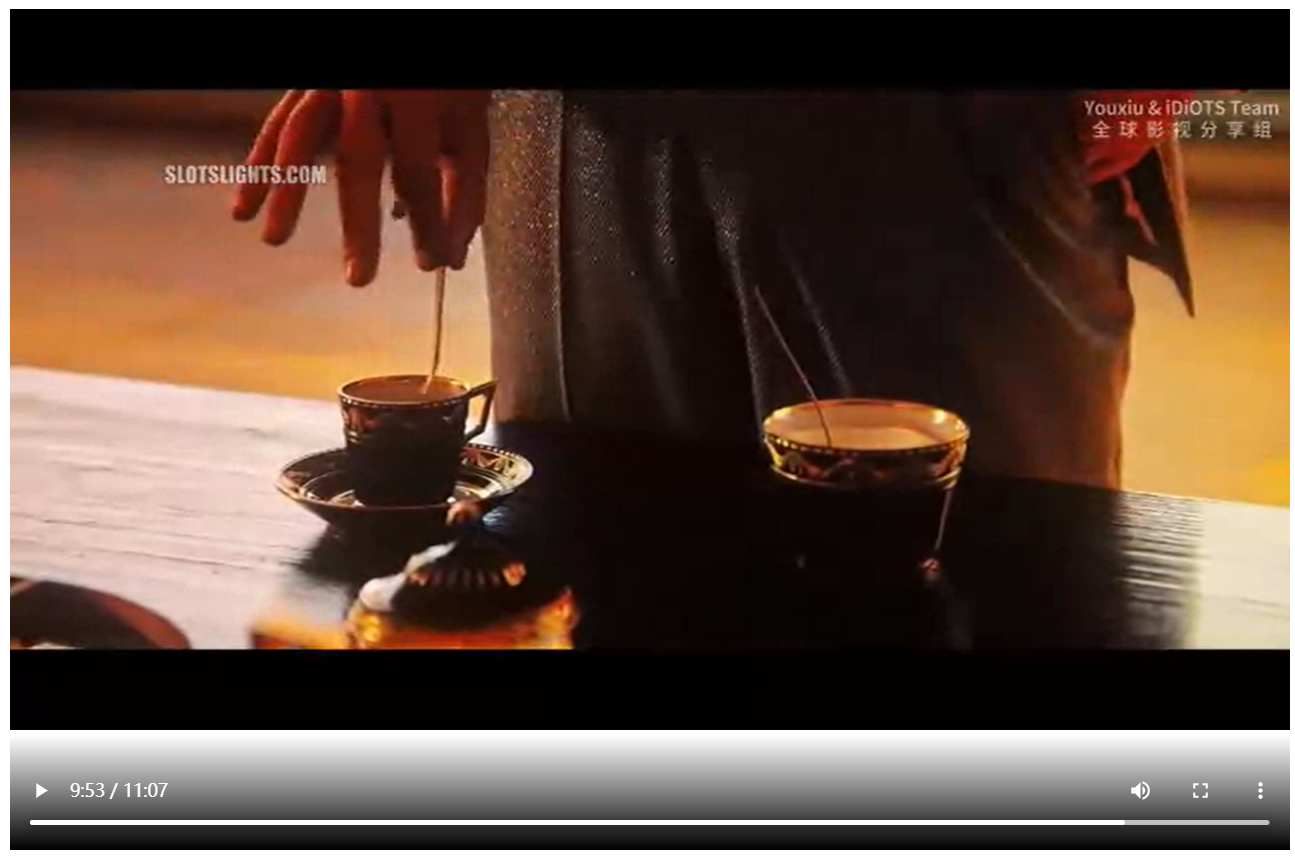
- 进度条可以拖动
ffmpeg用法
- 下载
- 转换webm参考
- ffmpeg命令参考
- ffmpeg官方文档
- 参考命令
./ffmpeg.exe -threads 12 -i D:\selfLearning\pyTrunk\JW2.mp4 -vcodec vp8 -acodec libvorbis -b:v 0 -crf 30 D:\selfLearning\pyTrunk\JW2.webm- 其中
-crf指定的是质量系数,越小质量越高
- 其中
- MediaSource 仅支持使用 MPEG-DASH 编码的 MP4 文件,或集群以关键帧开头的 WebM 文件(否则会引发错误:媒体片段未以关键帧开头)
- mp4控制关键帧间隔:
-g参数,以及-keyint_min参数 - 注意,将mp4转换为fmp4文件是根据关键帧划分的,参考
前端 v3.0
- 将通过
timeupdate判断是否往回拖动了进度条改为了通过video节点的updating事件判断(注意使用updated判断的时候有时候因为没有加载出来导致卡死)
<html lang="en">
<head>
<script src="https://apps.bdimg.com/libs/jquery/2.1.4/jquery.min.js"></script>
<meta charset="UTF-8">
<!-- <title>Title</title>-->
</head>
<body>
<!--<video id="video" width="1024" height="768" src="page/video"></video>-->
<div class="a">
<video id="video" width="1024" height="768" preload="auto" controls loop="true"></video>
<br>
<!-- <input id="range" type="range" min="0" step="1" max="100" value="0" width="1024px" onmouseup="dragRange()"></input>-->
</div>
<script>
videoElement = document.getElementById("video");
var videoSource;
var index = 0;
var bufferIndex = 0;
// segments = 0;
currentPos = 0;
numOfSeg = 0;
var curIndex;
file = "page/video";
var mime = 'video/webm; codecs="vorbis,vp8"'
// var mime = 'video/mp4; codecs="avc1.64001F, mp4a.40.2"'
function getNumOfSeg() {
var ret;
$.ajax({
type: "GET",
url: "page/video/segment",
success: function (data) {
var dict = JSON.parse(data);
console.log("dict:", dict['segments']);
window.numOfSeg = dict['segments'];
}
})
}
setInterval(function () {
console.log("video State is", videoElement.readyState);
// if(videoElement.readyState<3)
// {
// playSegment();
// }
}, 1000);
setupVideo();
function setupVideo() {
getNumOfSeg();
// clearLog(); // Clear console log
bufferIndex = 0;
// Create the media source
if (window.MediaSource) {
mediaSource = new window.MediaSource();
} else {
console.log("mediasource or syntax not supported");
return;
}
if (videoElement.src) {
URL.revokeObjectURL(videoElement.src);
}
var url = URL.createObjectURL(mediaSource);
videoElement.pause();
videoElement.src = url;
// videoElement.width = width;
// videoElement.height = height;
// Wait for event that tells us that our media source object is
// ready for a buffer to be added.
videoElement.addEventListener('seeking', handleSeek);
mediaSource.addEventListener('sourceopen', toInit, false);
mediaSource.addEventListener('sourceended', handleSourceEnd);
// Handler to switch button text to Play
// videoElement.addEventListener("pause", function () {
// playButton.innerText = "Play";
// }, false);
//
// // Handler to switch button text to pause
// videoElement.addEventListener("playing", function () {
// playButton.innerText = "Pause";
// }, false);
// // Remove the handler for the timeupdate event
// videoElement.addEventListener("ended", function () {
// videoElement.removeEventListener("timeupdate", checkTime);
// }, false);
}
function toInit(e) {
try {
console.log("toInit")
videoSource = mediaSource.addSourceBuffer(mime);
// videoSource = mediaSource.addSourceBuffer('video/mp4; codecs="avc1.4D2029, mp4a.40.2"');
setTimeout(initVideo, 500);
} catch (e) {
console.log('Exception calling addSourceBuffer for video', e);
return;
}
}
function initVideo() {
fetch("page/video",
{
method: "POST",
body: JSON.stringify({'current': index}),
// responseType: 'blob'
}).then(function (response) {
// console.log(response);
console.log("init", index);
// console.log(index);
// return response.arrayBuffer();
// return response.blob();
return response.arrayBuffer();
})
.then(function (response) {
try {
// videoSource.appendBuffer(new Uint8Array(response));
// var sourceBuffer = mediaSource.sourceBuffers[bufferIndex];
// sourceBuffer.appendBuffer(response);
videoSource.appendBuffer(response);
index++;
// videoElement.play();
// index+=1;
// Wait for the update complete event before continuing
// mediaSource.endOfStream();
// videoSource.addEventListener("updateend", updateFunct, false);
videoElement.addEventListener("timeupdate", getStarted);
videoElement.play().then(function () {
}).catch(function (err) {
console.log(err)
});
} catch (e) {
console.log(e);
}
});
}
function updateFunct() {
// This is a one shot function, when init segment finishes loading,
// update the buffer flag, call getStarted, and then remove this event.
// bufferUpdated = true;
// videoSource.removeEventListener("updateend", updateFunct, false);
// Now that video has started, remove the event listener
// videoSource.removeEventListener("update", updateFunct);
// console.log(("updating..."));
getStarted(); // Get video playback started
}
function getStarted() {
// Start by loading the first segment of media
// 根据现在的播放进度决定是否进行加载
window.curIndex = Math.ceil(videoElement.currentTime / mediaSource.duration * window.numOfSeg);
console.log("curIndex index", curIndex, index);
// console.log(videoElement.buffered);
if (index - curIndex < 1 && index < window.numOfSeg) {
// console.log("updating");
setTimeout(playSegment, 100);
setTimeout(updateFunct, 300);
} else if (curIndex - index < -1 && (videoElement.readyState < 3)) {
// videoElement.removeEventListener("timeupdate", getStarted);
// setTimeout(handleVideoLoad, 50);
// return;
}
// Start showing video time
// requestId = window.requestAnimationFrame(render);
// Display current index
// curIndex.textContent = index + 1;
// bufferIndex++;
// Continue in a loop where approximately every x seconds reload the buffer
// videoElement.addEventListener("timeupdate", fileChecks, false);
// videoSource.addEventListener("updateend", updateFunct, false);
}
function handleSeek()
{
console.log("handling seek");
if(index - curIndex<1)
{
return;
}
else if(videoElement.readyState<3)
{
console.log("seek to handle load");
videoElement.removeEventListener("timeupdate", getStarted);
setTimeout(handleVideoLoad, 200);
}
}
function handleVideoLoad() {
// index = curIndex < 1 ? curIndex : curIndex - 1;
// mediaSource.removeSourceBuffer(videoSource);
// setTimeout(function (){window.videoSource = mediaSource.addSourceBuffer('video/webm; codecs="vorbis,vp8"');index = 0;}, 500);
// index = 0;
// index = curIndex < 1 ? curIndex : curIndex - 1;
console.log("handing source load");
// index = curIndex-1;
// if(index<numOfSeg-1)
// videoSource.remove((index+1)*mediaSource.duration/numOfSeg, mediaSource.duration);
// setTimeout(function (){videoSource.remove(0, index*mediaSource.duration/numOfSeg);index = 0;}, 200);
// index = 0;
setTimeout(function (){videoSource.remove(0, (index>0?index-1:index)*mediaSource.duration/window.numOfSeg);index = curIndex-1;}, 200);
setTimeout(playSegment, 400);
setTimeout(function (){videoElement.addEventListener("timeupdate", getStarted)},600)
}
function handleSourceEnd()
{
// console.log("replaying, remove", 0, mediaSource.duration);
console.log("handling source end");
var prevTme = videoElement.currentTime;
index = 0;
// videoSource.remove(0, videoElement.duration);
// mediaSource.removeSourceBuffer(videoSource);
window.mediaSource = new MediaSource();
URL.revokeObjectURL(videoElement.src);
videoElement.src = URL.createObjectURL(mediaSource);
videoElement.currentTime = prevTme;
mediaSource.addEventListener('sourceopen', toInit, false);
mediaSource.addEventListener('sourceended', handleSourceEnd);
}
function playSegment() {
fetch("page/video",
{
method: "POST",
body: JSON.stringify({'current': index}),
// responseType: 'blob'
}).then(function (response) {
// console.log(response);
// return response.arrayBuffer();
// return response.blob();
return response.arrayBuffer();
})
.then(function (response) {
try {
console.log("loading: ", index);
function stampAndAppend() {
console.log("ready to append");
// mediaSource.endOfStream();
// function setTimeOffset()
// {
// // if (!videoSource.updating && mediaSource.readyState === 'open')
// // videoSource.timestampOffset = index * 7;
// return 0;
// }
// console.log(videoElement.error);
videoSource.appendBuffer(response);
console.log(videoElement.error);
// videoSource.endOfStream();
// videoElement.click();
// videoSource.removeEventListener("update", stampAndAppend);
console.log("buffer appended")
index++;
return 0;
// console.log("duration:", videoSource.duration)
}
console.log(mediaSource.readyState);
if (!videoSource.updating && mediaSource.readyState === "open") {
console.log(mediaSource.duration);
console.log(videoElement.currentTime);
stampAndAppend();
// setTimeout(stampAndAppend, Math.floor(mediaSource.duration / numOfSeg / 2 * 1000));
// stampAndAppend();
}
// videoSource.addEventListener("update", stampAndAppend);
// var sourceBuffer = mediaSource.sourceBuffers[mediaSource.sourceBuffers.length-1];
// // while(mediaSource.sourceBuffers.updating){}
// sourceBuffer.appendBuffer(response);
// bufferIndex++;
// videoElement.play();
// Wait for the update complete event before continuing
// videoSource.addEventListener("update", updateFunct, false);
// var buffer = mediaSource.addSourceBuffer('video/webm; codecs="vorbis,vp8"');
// buffer.appendBuffer(response);
} catch (e) {
console.log(e);
// console.log(mediaSource.error);
}
});
}
// player.load();
// console.log("loading");
</script>
<br>
<!--<input id="range" type="range" min="0" step="1" max="100" value="0" width="1024px"></input>-->
<!--<button onclick="reloadVideo()">reload</button>-->
<script>
// function reloadVideo() {
// player = document.getElementById("video");
// // setVideoLoad();
// player.load();
// player.play();
// console.log("reloading...");
// }
//
// reloadVideo();
// setVideoLoad();
</script>
<!-- <button id="pause">pause</button>-->
</body>
</html>
<script>
player = document.getElementById("video");
// player.onclick = function pauseAndPlay() {
// console.log("clicked!")
// if (player.paused) {
// player.play()
// } else {
// player.pause()
// }
// }
</script>
<script>
// range = document.getElementById("range");
//
// function refreshRange() {
// range.innerHTML = currentPos;
// }
//
// setInterval(function () {
// refreshRange();
// }, 1000);
</script>