C语言获取命令行的返回内容
- 参考链接
- 示例程序
int main(void)
{
char* szCmd = "ls -l";
FILE* pResultStr = NULL;
char szBuf[1024] = {0};
/* 创建子进程,执行shell命令 */
pResultStr = popen(szCmd, "r");
if (NULL == pResultStr)
{
printf("popen faild. (%d, %s)\n",errno, strerror(errno));
return -1;
}
/* 获取返回结果 */
fread(szBuf, 1, sizeof(szBuf), pResultStr);
/* 打印命令返回内容 */
printf(szBuf);
/* 不要忘记关闭句柄 */
pclose(pResultStr);
return 0;
}输出
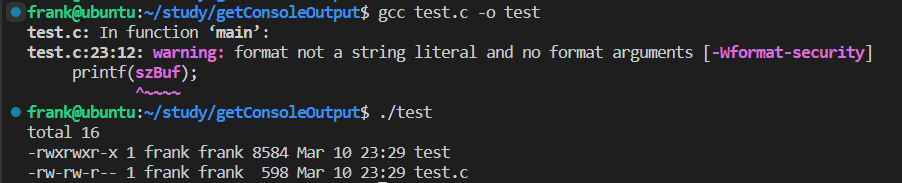
- 可见,多了一行
total 16含义是popen函数
popen()函数通过创建一个管道,调用 fork 产生一个子进程,执行一个 shell 以运行命令来开启一个进程。- 这个进程必须由
pclose()函数关闭,而不是fclose()函数。pclose()函数关闭标准 I/O 流,等待命令执行结束,然后返回 shell 的终止状态。如果 shell 不能被执行,则pclose()返回的终止状态与 shell 已执行 exit 一样。 - 也就是,popen创建管道,执行shell命令将文件流中的某些数据读出
头文件和函数头
#include <stdio.h>FILE *popen(const char *command, const char *type);
- command: 是一个指向以 NULL 结束的 shell 命令字符串的指针。命令将被传到 bin/sh 并使用 -c 标志,shell 将执行这个命令,比如
sh -c ls - type: 只能是读或者写中的一种,得到的返回值(标准 I/O 流)也具有和 type 相应的只读或只写类型。如果 type 是 “r” 则文件指针连接到 command 的标准输出;如果 type 是 “w” 则文件指针连接到 command 的标准输入。
另一种方法
作者:Reticence
链接:https://www.zhihu.com/question/508000943/answer/2285530356
来源:知乎
著作权归作者所有。商业转载请联系作者获得授权,非商业转载请注明出处。
int main() {
char *argv[] = {"ls", NULL };
int pipe_fd[2];
char buffer[256];
memset(buffer,0,256);
pipe(pipe_fd); // 忽略了错误处理
int pid = fork(); // 忽略了错误处理
if (pid > 0) {
sleep(1);
close(pipe_fd[1]); // 关闭管道输出
read(pipe_fd[0], buffer, 256); // ls的输出到buffer了,你可以进行你的处理
printf("ls = %s",buffer);
// 父进程
} else {
close(pipe_fd[0]); // 关闭管道读入
dup2(pipe_fd[1], STDOUT_FILENO); // 关闭标准输出,改成管道输出
execv("/usr/bin/ls", argv);
}
}管道开启和关闭
- linux man手册参考
int pipe(int pipefd[2]); - 其中
pipefd[0]是读一侧pipefd[1]是写入一侧 - 写入的时候要关闭读一侧,读的时候要关闭写入的一侧
dup2用法
- 转移输出定向
- 参考链接
文件描述符和FILE指针互相转换
- 参考链接
跨越进程的dup2(dup2与execv和execlp一起使用的问题)
- 运行上述程序可见,主进程并不能抓取到输出
- 然后做了以下测试,在子线程中直接讲
execv修改为printf函数,结果发现主线程能抓取到printf函数的输出 - 可以推测在
execv创建新的线程之后,之前的dup2并不起到作用了 - 但是发现使用
execlp可以,使用execv不行,格式为execlp(argv[0], argv[0], argv[1], argv[2]);- 其中
argv分别是echo,输出的字符串和NULL
- 其中
- 类似地,对
execv函数的参数作出修改,还是没法收到,暂时不清楚原因 - 最终版代码
int main()
{
char *argv[] = {"ls", "-l", NULL, NULL};
// char *argv[] = {"echo", NULL, NULL};
int pipe_fd[2];
char buffer[256];
char routeBuf[256];
FILE* pipeWrite;
getcwd(routeBuf, 256);
// argv[2] = routeBuf;
argv[1] = routeBuf;
pipeWrite = fdopen(pipe_fd[1], "w");
printf(argv[1]);
printf("\n");
memset(buffer, 0, 256);
printf("pipe return: %d\n", pipe(pipe_fd)); // 忽略了错误处理
int pid = fork(); // 忽略了错误处理
if (pid > 0)
{
// sleep(1);
wait();
close(pipe_fd[1]); // 关闭管道输出
printf("read: %d\n", read(pipe_fd[0], buffer, 256)); // ls的输出到buffer了,你可以进行你的处理
printf("ls = \n%s\n", buffer);
// 父进程
}
else
{
close(pipe_fd[0]); // 关闭管道读入
// fflush(stdout);
dup2(pipe_fd[1], STDOUT_FILENO); // 关闭标准输出,改成管道输出
// fflush(stdout);
// execv("/usr/bin/ls", argv);
// execv("echo", argv);
execlp(argv[0], argv[0], argv[1], argv[2]);
// execlp(argv[0], argv[0], argv[1], argv[2]);
// printf("test\n");
fflush(pipeWrite);
// close(pipe_fd[1]);
}
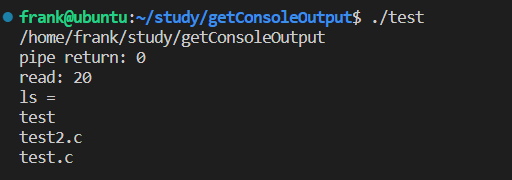
} - 输出:
- 上述代码修改参考链接
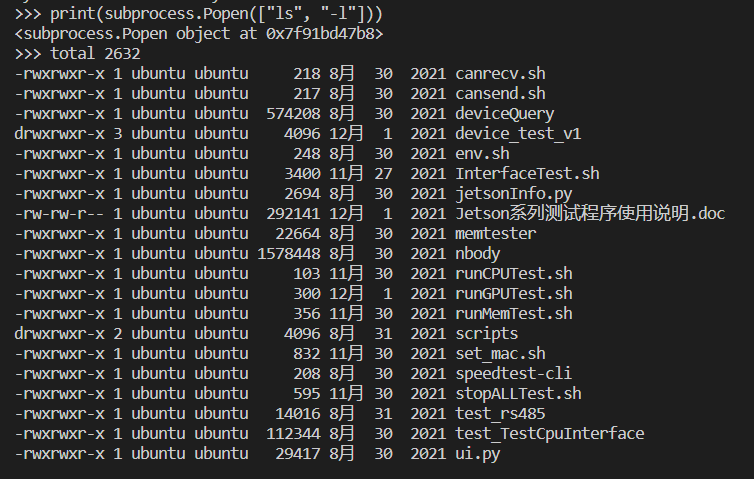
python开启新的子进程并且获取命令行的返回值
- 从python2.4版本开始,可以用
subprocess这个模块来产生子进程,并连接到子进程的标准输入/输出/错误中去,还可以得到子进程的返回值。 - 比如
subprocess.Popen(command, stdout = subprocess.PIPE) - 去掉后面的手动指定参数,输出结果为