0%

python多线程以及线程同步

python多线程以及线程同步

多线程基础知识

  • python创建多线程主要依靠threading库
import threading
  • 线程的创建使用Thread()函数,提供的参数为线程的函数指针和函数的参数(必须为可迭代的对象)
def task(num):
for i in range(num):
print(i)

t1=threading.Thread(target=task, args=(3,)) # 注意此处不能使用args=(3),否则会因为传入的参数不可迭代导致错误,必须加逗号
  • 线程的开始使用start(),使用join()回收线程
# 多线程
t1.start()
t2.start()
t3.start()

# 回收线程
t1.join()
t2.join()
t3.join()

多线程时间测试

  • 线程执行任务为控制台输出的
import threading
import time

def task(num):
for i in range(num):
print(i)

t1=threading.Thread(target=task, args=(3,))
t2=threading.Thread(target=task, args=(3,))
t3=threading.Thread(target=task, args=(3,))

start = time.time()

# 多线程

t1.start()
t2.start()
t3.start()

# 回收线程
t1.join()
t2.join()
t3.join()

print("多线程用时:%.8f\n"%(time.time()-start))

# 单线程

start = time.time()

for i in range(3):
task(3)

end = time.time()

print("单线程用时:%.8f\n"%(end-start))
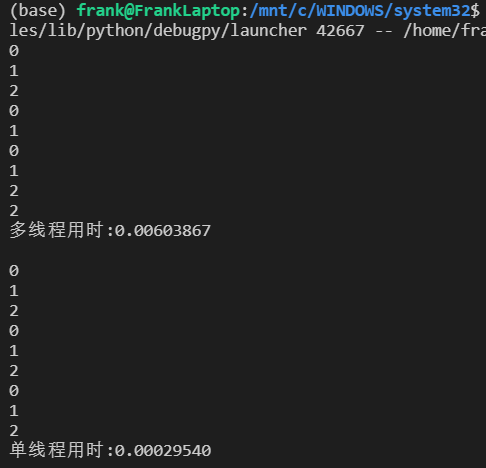
  • image-20220628093137346

    • 可见,多线程用时还更多一些
  • 多线程执行不涉及IO的操作(比如加法)

import threading
import time

def task(num):
count = 0
for i in range(num):
count+=1

t1=threading.Thread(target=task, args=(3,))
t2=threading.Thread(target=task, args=(3,))
t3=threading.Thread(target=task, args=(3,))

start = time.time()

# 多线程

t1.start()
t2.start()
t3.start()

# 回收线程
t1.join()
t2.join()
t3.join()

print("多线程用时:%.8f\n"%(time.time()-start))

# 单线程

start = time.time()

for i in range(3):
task(3)

end = time.time()

print("单线程用时:%.8f\n"%(end-start))
  • 输出结果为
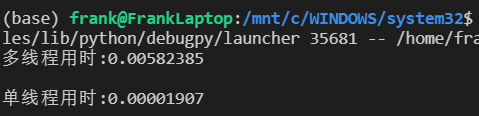
    • image-20220628093356210
    • 可见,单线程比多线程的优势更明显了

原因

  • 你会发现多线程比单线程花费的时间还要更多,这是因为GIL的原因。

    GIL的全称是Global Interpreter Lock(全局解释器锁),Python最初的设计理念在于,为了解决多线程之间数据完整性和状态同步的问题,设计为在任意时刻只能由一个线程在解释器中运行。因此Python中的多线程是表面上的多线程(同一时刻只有一个线程),不是真正的多线程。

    但是如果是因为GIL的原因,就说多线程无用是不对的,对于IO密集的程序,多线程是要比单线程快的。

  • 参考链接

python线程同步

  • python线程同步具有一些与C类似的机制,比如各种锁和获取、释放锁等等
  • 参考链接

同步锁Lock

lock = threading.Lock()
lock.acquire()
lock.release()
  • 用于保护临界区

  • 由于threading.Lock()对象中实现了enter__()与__exit()方法,故我们可以使用with语句进行上下文管理形式的加锁解锁操作

with lock:
# 自动加锁
global num
for i in range(10_000_000):
num += 1
# 自动解锁

RLock() 递归锁

  • 递归锁是同步锁的一个升级版本,在同步锁的基础上可以做到连续重复使用多次acquire()后再重复使用多次release()的操作,但是一定要注意加锁次数和解锁次数必须一致,否则也将引发死锁现象。

  • 其他部分类似,不再详细赘述

Condition() 条件锁

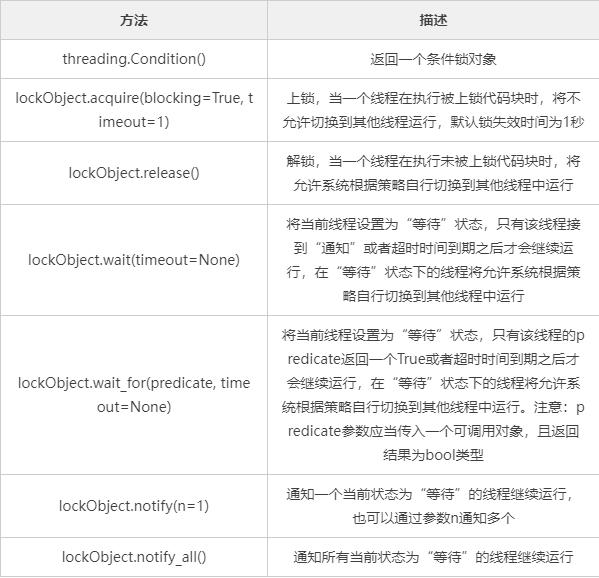
  • 条件锁是在递归锁的基础上增加了能够暂停线程运行的功能。并且我们可以使用wait()与notify()来控制线程执行的个数。

    注意:条件锁可以自由设定一次放行几个线程。
  • img

import threading

currentRunThreadNumber = 0
maxSubThreadNumber = 10


def task():
global currentRunThreadNumber
thName = threading.currentThread().name

condLock.acquire() # 上锁
print("start and wait run thread : %s" % thName)

condLock.wait() # 暂停线程运行、等待唤醒
currentRunThreadNumber += 1
print("carry on run thread : %s" % thName)

condLock.release() # 解锁


if __name__ == "__main__":
condLock = threading.Condition()

for i in range(maxSubThreadNumber):
subThreadIns = threading.Thread(target=task)
subThreadIns.start()

while currentRunThreadNumber < maxSubThreadNumber:
notifyNumber = int(
input("Please enter the number of threads that need to be notified to run:"))

condLock.acquire()
condLock.notify(notifyNumber) # 放行
condLock.release()

print("main thread run end")

# 先启动10个子线程,然后这些子线程会全部变为等待状态
# start and wait run thread : Thread-1
# start and wait run thread : Thread-2
# start and wait run thread : Thread-3
# start and wait run thread : Thread-4
# start and wait run thread : Thread-5
# start and wait run thread : Thread-6
# start and wait run thread : Thread-7
# start and wait run thread : Thread-8
# start and wait run thread : Thread-9
# start and wait run thread : Thread-10

# 批量发送通知,放行特定数量的子线程继续运行
# Please enter the number of threads that need to be notified to run:5 # 放行5个
# carry on run thread : Thread-4
# carry on run thread : Thread-3
# carry on run thread : Thread-1
# carry on run thread : Thread-2
# carry on run thread : Thread-5

# Please enter the number of threads that need to be notified to run:5 # 放行5个
# carry on run thread : Thread-8
# carry on run thread : Thread-10
# carry on run thread : Thread-6
# carry on run thread : Thread-9
# carry on run thread : Thread-7

# Please enter the number of threads that need to be notified to run:1
# main thread run end
  • 注意,上面的代码中的线程在使用acquire()获取锁之后,进入了休眠状态(也就是wait()),然后等待锁的notify()函数唤醒相应数量的正在休眠的进程

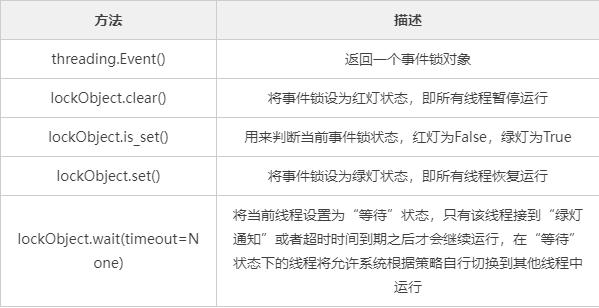
Event() 事件锁

  • 事件锁是基于条件锁来做的,它与条件锁的区别在于一次只能放行全部,不能放行任意个数量的子线程继续运行。

    我们可以将事件锁看为红绿灯,当红灯时所有子线程都暂停运行,并进入“等待”状态,当绿灯时所有子线程都恢复“运行”。
  • img

import threading
maxSubThreadNumber = 3
def task():
thName = threading.currentThread().name
print("start and wait run thread : %s" % thName)
eventLock.wait() # 暂停运行,等待绿灯
print("green light, %s carry on run" % thName)
print("red light, %s stop run" % thName)
eventLock.wait() # 暂停运行,等待绿灯
print("green light, %s carry on run" % thName)
print("sub thread %s run end" % thName)

if __name__ == "__main__":
eventLock = threading.Event()
for i in range(maxSubThreadNumber):
subThreadIns = threading.Thread(target=task)
subThreadIns.start()
eventLock.set() # 设置为绿灯
eventLock.clear() # 设置为红灯
eventLock.set() # 设置为绿灯

# start and wait run thread : Thread-1
# start and wait run thread : Thread-2
# start and wait run thread : Thread-3
# green light, Thread-1 carry on run
# red light, Thread-1 stop run
# green light, Thread-1 carry on run
# sub thread Thread-1 run end
# green light, Thread-3 carry on run
# red light, Thread-3 stop run
# green light, Thread-3 carry on run
# sub thread Thread-3 run end
# green light, Thread-2 carry on run
# red light, Thread-2 stop run
# green light, Thread-2 carry on run
# sub thread Thread-2 run end
  • 不能使用with语句进行调用

Semaphore() 信号量锁

  • 信号量锁也是根据条件锁来做的,它与条件锁和事件锁的区别如下:

    • 条件锁:一次可以放行任意个处于“等待”状态的线程
    • 事件锁:一次可以放行全部的处于“等待”状态的线程
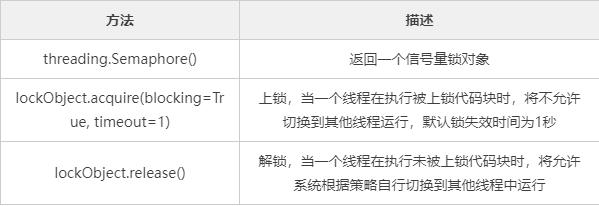
    • 信号量锁:通过规定,成批的放行特定个处于“上锁”状态的线程
  • img

import threading
import time

maxSubThreadNumber = 6


def task():
thName = threading.currentThread().name
semaLock.acquire()
print("run sub thread %s" % thName)
time.sleep(3)
semaLock.release()


if __name__ == "__main__":
# 每次只能放行2个
semaLock = threading.Semaphore(2)

for i in range(maxSubThreadNumber):
subThreadIns = threading.Thread(target=task)
subThreadIns.start()


# run sub thread Thread-1
# run sub thread Thread-2

# run sub thread Thread-3
# run sub thread Thread-4

# run sub thread Thread-6
# run sub thread Thread-5
  • 注意调用Semaphore()初始化的时候传递参数指定同时能够放行的线程数量
  • 也可以使用with语句
import threading
import time

maxSubThreadNumber = 6


def task():
thName = threading.currentThread().name
with semaLock:
print("run sub thread %s" % thName)
time.sleep(3)


if __name__ == "__main__":

semaLock = threading.Semaphore(2)

for i in range(maxSubThreadNumber):
subThreadIns = threading.Thread(target=task)
subThreadIns.start()